Showing posts with label photoshop. Show all posts

Saturday, January 26, 2008

Techno Girl

That's me! Part time Techno Girl! Oh! I just love my computers, cell phones, PDA....all of it! So a couple of years ago, I thought....why not scrap it? I had a "dead" laptop and just couldn't really part with it. After all, my fingers had been tapping on it for the past 3 years. And my cell phone....well...it had been glued to my ear at one time (or so my hubby says!)

So, I got this brillant idea (well at least I thought it was brilliant) to take apart my laptop and re-create it in a cigar box! HA! Have you ever actually taken apart a laptop? It does require that you be able to see the microscopic screws used to hold it all together and in some cases.....to unsolder things! What a trip!

This is what I ended up with. The cigar box is mounted on cut out foam board (you need something pretty strong to support a cigar box!)
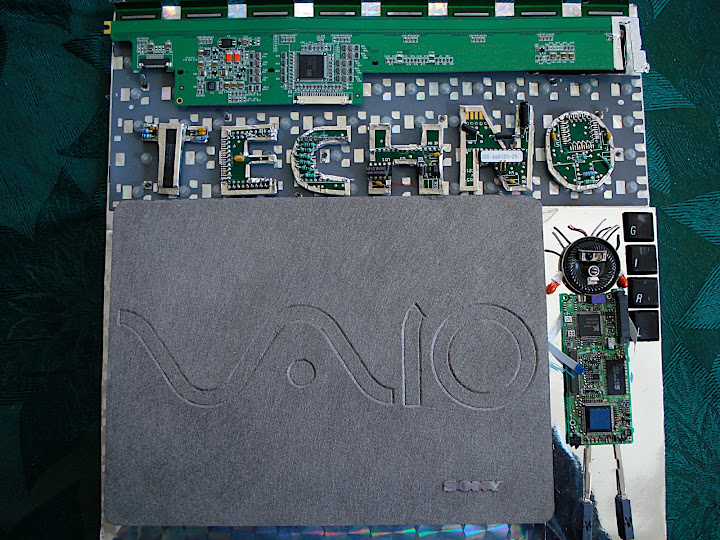


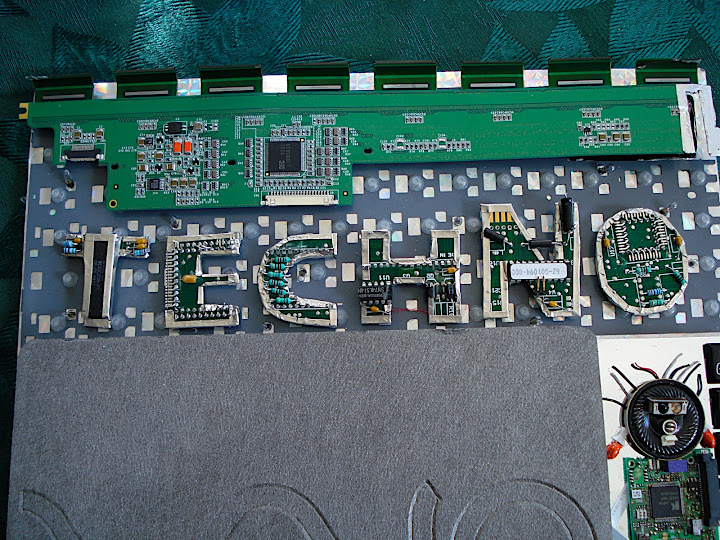
Across the top is part of the mother board. I used a jigsaw to cut out the letters for "techno" and wrapped them in silver tape. On the upper right hand is a lever and when you pull down on it, there are lights that light up around "techno". The batteries are hidden under the green strip. Sort of cute, huh?


This is "girl"....made from computer parts that were soldered apart. Her feet are the tabs that ejected CDs....so they actually move. I used "keys" to spell the word "girl".
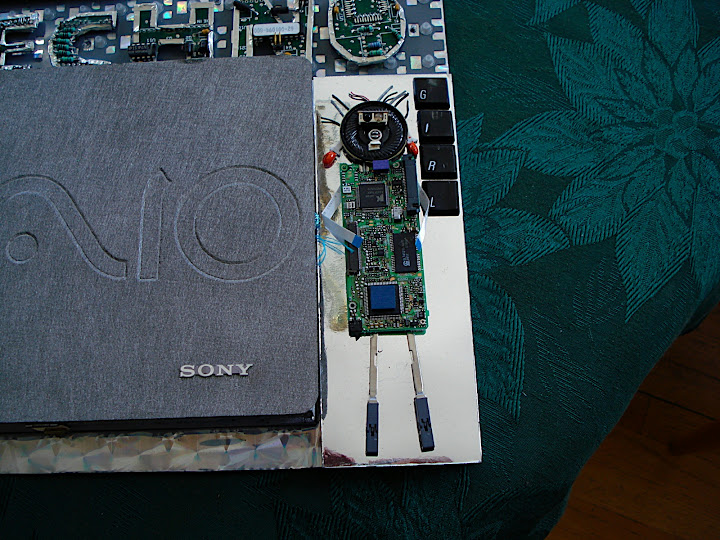


She flips open and under her is my old cell phone. Yeah, you can tell...that's old! The cell phone was gutted, but it flips up and literally rings. Always gets a laugh out of anyone who looks at this one!


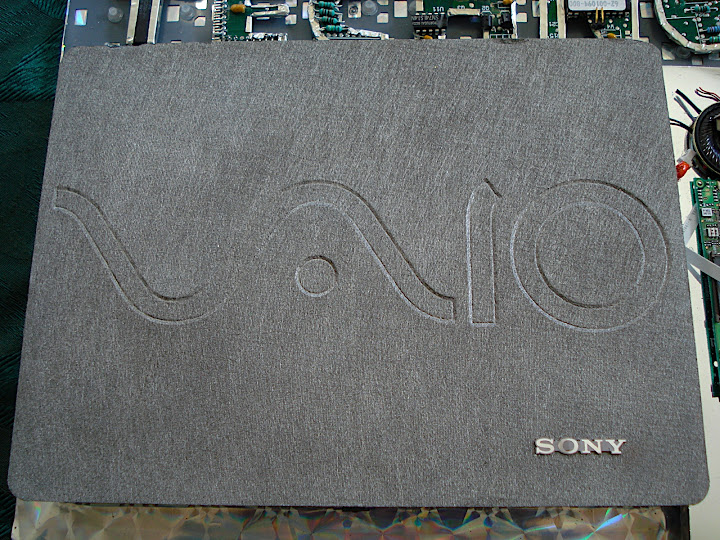
I believe it was Ertyl paper that I used for the cover of the cigar box. I embossed the cover of my laptop into the metal paper and then glued the Sony ID to the top. Looks a whole lot like my original laptop...just a whole lot smaller!


I had to cut some of the keys to make them fit...but I got most of them crammed into the space I had. The top is the physical screen from the laptop. That was such an experience....taking apart the monitor. I learned a lot though about what's inside a computer!
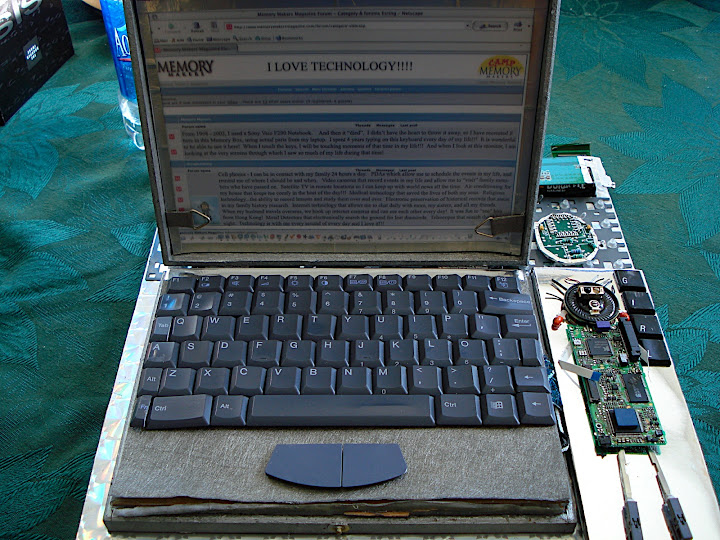


Did you know there are layers of screens? I sure didn't!! So I made layers of screens, edging them all with silver tape. I then printed out the story of how Kerry and I met online at yahoo.com....and that's the story and journaling for this project. I was able to recreate the actual yahoo screens of how we met. Pretty cool! OK...that photo was taken in 1998...the year we met!


The keyboard flips open (just like the laptop) and under that you will find my "hard drive"! LOLOL! OK...I journaled a bit about Scrapbook Technology and called it Scrapology. A pic of me there on the bottom in my old studio...man, was that a small, crammed space! ON the top...my old PDA and a CD book:


In the CD book, I talked about medical technology and how that benefited both of my sons. I talked about technology in religion and how we no longer need to limit what we believe to what someone behind a pulpit decides to talk about each week....we have the world at our fingertips!


Of course, the PDA opens up....and the back of the CD book is a CD dipped in 6 layers of UTEE, stamped, and inked with perfect pearls. Did I mention I did this in 2005? Long before I was part of the Ranger design team...I loved UTEE!!!
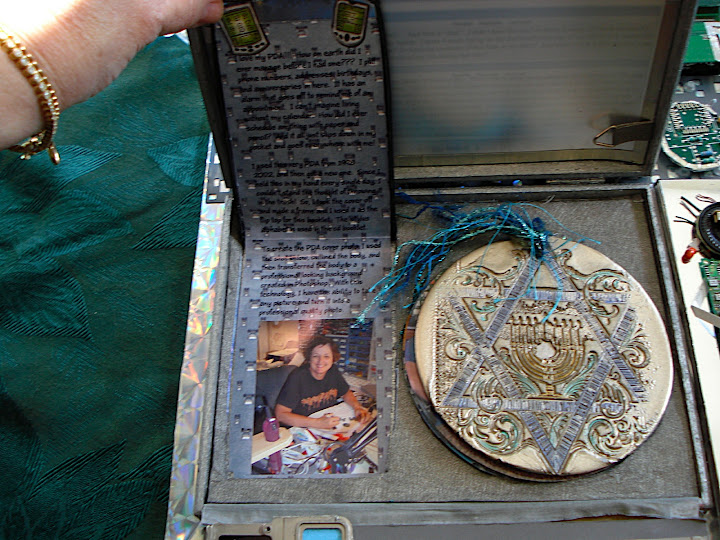


A close-up of the CD....I just love this one. Think it would make great ornaments or window hangers!


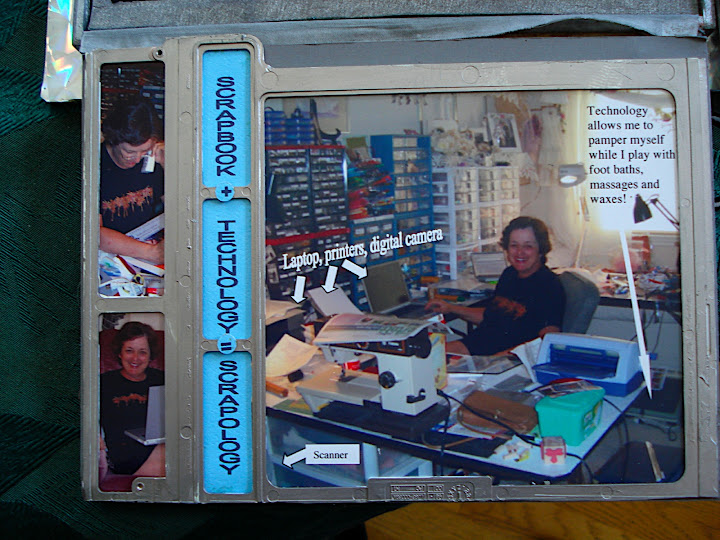
Would you look at this mess I called a studio? Yes....I had a foot bath and foot massager under my work table! Smart geek girl!


This is what the whole thing looks like unfolded. Amazing how much you can get inside a little 1" thick cigar box!
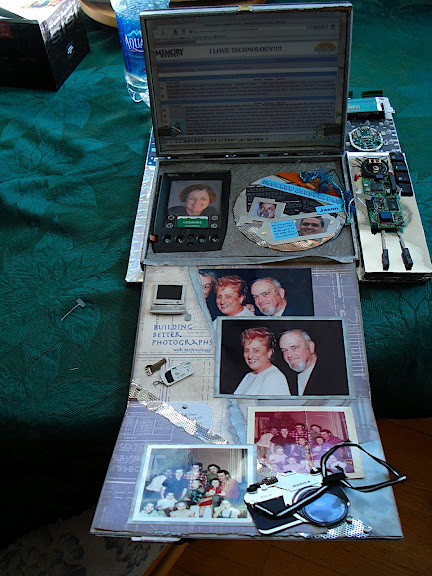


Here, I was showing how technology can build better photographs. I removed my husband from the photo and took years and weight off my in-laws. Yeah....now you will just have to wonder how many of my other photos I have altered! LOL!


And here I was showing how technology can restore the past....that pink photo is the original one that has been very nicely restored for future generations!
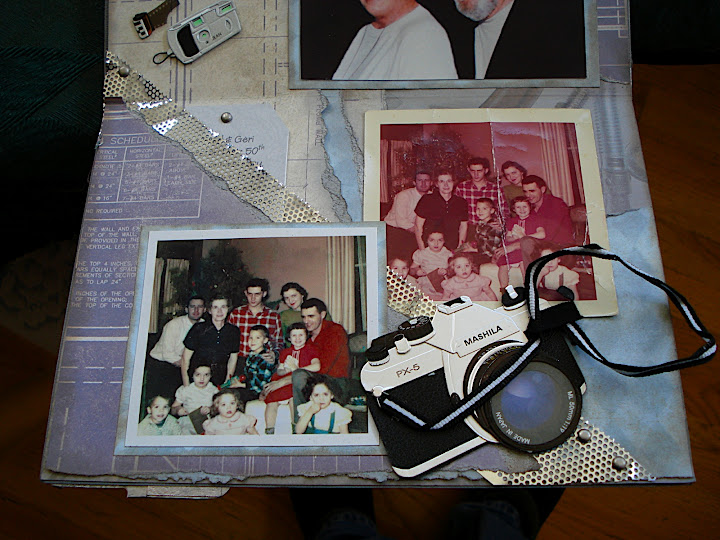


Wow! Anyone want to do an altered cigar box my way? Will take you about a week...but truly, this one sits in the entry way to our home and all who see it just love it.

Back to my original thoughts....if there is something in your life that you use on a daily basis....why not scrap it, alter it, keep it for the rest of your life? My cell phone, my laptop, my PDA....were treasures for 3 years and now they are a treasure for all time.

I am now on my second mac power book since the vaio, my 3rd or 4th cell phone...and I have traded in the pda as I use my iphone for that. I download photos from my iphone or camera into iphoto, then upload them to my picasa album where they are exported to my blogger. I LOVE technology! I'm truly a techno girl at heart....and playing with all this technology is what I love to do!

Tuesday, January 1, 2008

New Year's Eve

I have a cold, so we stayed home last night and I spent my evening watching videos about digital scrapbooking! For this one, I took my aunt and uncle out of the photo in my last blog and learned how to "spherize" them into an ornament! I didn't even know "spherize" was a word! But it is in photoshop! Filter/distort/shperize. Great tutorial by Scrappers Guide on this one!


And how fun is that font? Called "Bleeding Cowboys" and it's free at DaFont. I can hardly wait to see what else I can learn. I'm thinking digi scrapping may be rather addictive.

Wednesday, December 26, 2007

2008 CD Calendar

I'm having such a great time with ditigal stuff, but I'm planning to switch back to paper for my 2008 calendar. However, I'm looking for opinions comparing these 2 types of calendars before I move forweard.

This first one is a calendar that I purchased from Scrappers Guide. It's a transparency and I pulled it in over a piece of paper that I designed.


This next calendar was created in excel in a table, converted to a jpg, and then changed to a transparency. A whole lot more work, but I think I like the boxes for each calendar date. Could give me a little space to write things inside the box.


Converting a black and white photo to a transparency was a bit tricky, but for those of you who like to try new things, here's my instructions:

Open a black and white jpg photo in Photoshop CS3

Click on the background eraser tool
Set the brush to 130 pixesl (use a round brush)
Click on "sampling continuous"
change limits to "discontiguious"
Set the tolerance at 12%
And click the box to protect foreground color

Then "paint" the entire picture with your brush. It paints all the white areas to transparency. It's a pretty cool way to do things. You can then drag the transparency on top of something else to get a fun new look


I'm off to play with this technique tonight...just to see what kind of collages I can make using old photos. Should be fun! Oh, and stay tuned, I'm working on a pocket filled, action packed, interactive calendar for 2008. Just the thing you will want to carry around to keep track of your play time!!!

Monday, December 24, 2007

10 Second Layout

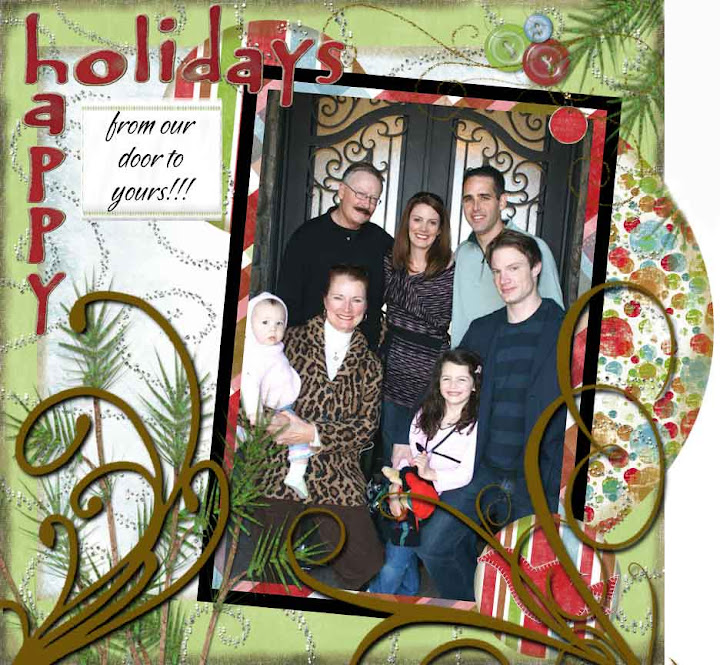
OK, maybe 10 minutes! But how fast can one design a great layout, card, tag, brochure, flyer....anything.. using digital scrapbooking techniques. Now, I still prefer paper as I'm a hands-on type of gal....but when I can't get to my studio, this is just so much fun!!!


I thought that was "good", but then I decided to play around with my brushes tool and some shadowing techniques. Look what happened when I added 2 simple brush clicks! Oh wow! I think I need to run through a few more tutorials on brushes!!!


I love the fact that the family is standing in front of the door and that's where the greeting came from. Something so simple, so quick, so much fun! I received the photo as an email attachment, and quickly sent it back as a layout! Of course, the little girls are Kerrys granddaughters, so it's all in the family!

How much fun can you have in 10 minutes?

Friday, December 21, 2007

Making dreams come true

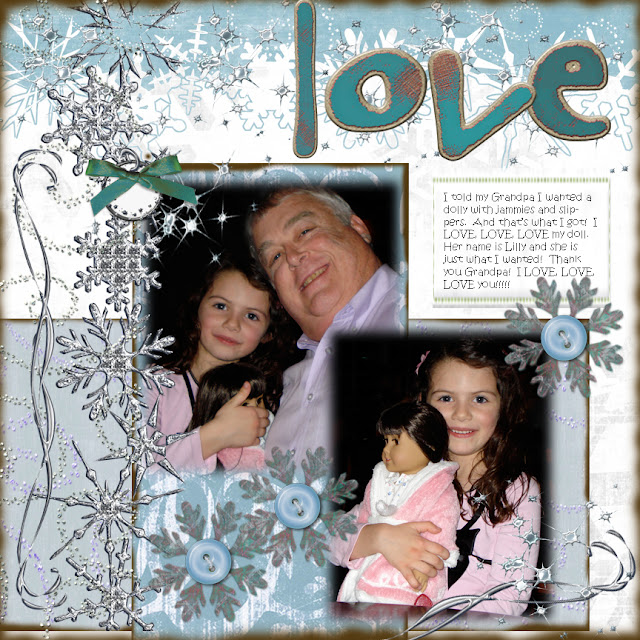
I absolutely love to make a child's dream come true! Kerry's granddaughter came to visit a few weeks ago and informed us that she really wanted a very specific doll....but she must have her own jammies and slippers! Kids can be so cute when they know exactly what they want! So, Grandpa ordered it...and you can tell from the look on her face, she's not the least bit disappointed!


I love it that this child knew exactly what she wanted, described it perfectly down to the very outfit the doll needed. I think somewhere between childhood and adulthood, we lose the ability to articulate exactly what we want. Or perhaps we just don't know any more what it is that we want! Take a moment and think back to when you were a child. What was your dream? Did it come true? If not, why not make it come true now?

This is only my second ever digital layout. So I still feel like my brain is stretching, trying to squeeze in more new stuff. I used paper from Scrappers Guide again, but this time, I changed the colors to meet my wants. Sort of fun!

May all your dreams come true...and may you journal, scrap, record and save the memories of moments like this!

Thursday, December 20, 2007

Brain stretching?

Well, that's how I feel this week...like I'm stretching my brain beyond it's capacity! I'm learning photoshop and Illustrator, iweb, html, and all kinds of technical stuff. So I decided....why not try digital scrapping? OK, OK, OK....I swore I would never do this...but hey! mom said, "Never say never!"

This is my first ever attempt at digital scrapbooking and I just could not resist. We put coat and antlers on our puppies yesterday and snapped their photos and they just looked so pathetic....like they just wanted to know "WHY?"


I have to confess....I have subscribed to The Scrappers Guide. They just make it so easy! And I don't have Photoshop Elements...I'm using what they teach with my Photoshop CS3...it works just fine! I love the online videos...but have only had time to watch 3 of them! Just think what I can do when I learn the rest of this!

Poor Katie and Men. They are such good puppies. I wonder why on earth I do things like this to them? Well, they don't like the antlers, but they do love their new winter coats! Men growls when I take his off and Katie will run and hide under hers.


So if I go off the deep end and start digi scrapping everything...we will just blame it on the puppies! In the meantime, I think I'll see what I can learn new today and stretch my brain just a little bit more!

Friday, November 16, 2007

Christmas 1958

Most of mom's old photos have been ripped out of albums until they are quite damaged. But this one...not only bent through the center...it somehow managed to turn pink/red over the years!!!


With a bit of editing in Photoshop, I think I've managed to restore it quite nicely. Even the plaid on the shirt matches through the tear!


Photoshop is just so wonderful for giving back memories of things that were forgotten. Now, I can't recall the the walls were pink in that house, so my colors may still be off a bit. I'm not sure dad would have worn a burgandy shirt....but it was Christmas and mom is wearing green (too cute!)

In 1958, Grandma was my age (GASP!) and I swear she looks a whole lot younger than I do today! LOL! Mom and dad were only 28? Yikes...my oldest son is 28! They had 4 little girls, ages 7,6,4 and almost 3....I'm not a grandma yet (thank goodness!) The 2 little boys are our cousins and my 2 uncles are in the photo.

I'm the one looking bored, playing with a book. Colleen is on dad's lap. Elaine is probably putting on play lipstick, I remember we played with that a lot. And April is the cutie in the pink dress.

Photoshop not only fixes photos...it fixes memory!

Friday, October 19, 2007

Coloring your life

I just love what you can do with photoshop. And sometimes old photos in black and white are just boring. But when you add color, it can totally change how you look at the past.


I think it brings things into perspective, makes the photo more interesting....but most of all, it makes you study the photo and you will see things that you never noticed before. For instance, I never noticed that my hand is not showing..it's tucked up inside my snowsuit. That's my Aunt Jean behind me and I'd love to know what color her shoes were. Notice I have no feet? Well, I'm just hopeing my shoes are also tucked up inside my snowsuit!!! There's a chipped brick in the backgound....things like that. It also makes you woner what color we were really wearing. The colors of the early 50s were more dull than the colors we have today, I can only guess at what they actually were.

If you don't have photoshop, you can always color with inks, chalks, markers, oils....I just think adding color to the past brings it into the present and adds life to whatever you are working with. Color your life....make it something you never knew it could be!